

Description
Vivo Y71 Folder (Black)
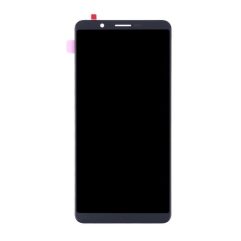
Is your Vivo Y71 display broken? Buy the Complete LCD with Touch Screen for Vivo Y71 – Black and replace your broken, cracked, or scratched screen. 100% perfect fit with high build quality. Replacing the display for your handset is the easiest, with minimal technical know-how.
- The easiest part type available to replace the Vivo Y71 Black in your handset, requiring minimal technical knowledge.
- quality product 100% perfect fit.
- Complete display combo with LCD screen and digitizer touch screen.
- 100% Tested before shipping.
A Vivo Y71 Folder (Black) is a complete display assembly, often called a “combo,” used to replace a damaged screen. It includes both the LCD display and the capacitive touch digitizer pre-bonded as a single unit.
Technical Product Description
Integrated Unit: This is a pre-assembled module where the IPS LCD panel and the touchscreen glass are fused together.3 This design prevents dust from entering between layers and ensures the screen fits flush with the phone’s frame.
Visual Specifications: Retains the original 6.0-inch screen size with a HD+ resolution of 1440X720 pixels. The Black version is designed to perfectly match the bezels of the Matte Black and Gold variants.
Touch Performance: Features a highly sensitive digitizer that supports multi-touch gestures, restoring the smooth scrolling and responsiveness of a factory-new device.
Installation: Includes a precision-machined ribbon flex cable that connects directly to the motherboard, making it a “plug-and-play” part that requires no soldering for the display itself.
Compatibility: Specifically designed for the Vivo Y71 (Model 1724 / 1801) and is also fully compatible with the Vivo Y71i.
Recommended Replacement Options
The Vivo Y71 Original LCD with Touch Screen is a top-tier OEM replacement that provides the exact color accuracy, brightness, and durability as your original screen. It is the best choice for users who want to maintain the phone’s original high-definition visual quality.
For a more budget-friendly repair, the LCD with Touch Screen for Vivo Y71 – Black is a high-quality A+ grade compatible folder. This unit is manually tested for touch response and visual clarity, offering a reliable fix at a lower price point.
Important Installation Tips
The “Dry Test” Rule: Always connect the folder to the motherboard and test all touch points and brightness levels before applying adhesive. Removing protective films or applying glue typically voids the replacement warranty.
Safety First: Disconnect the battery flex before installing the new screen to prevent electrical shorts that could damage the motherboard’s display IC.
Clean the Frame: Thoroughly remove old glue and glass shards from the middle frame. For a professional seal, use T-7000 (Black) adhesive to prevent light leakage around the edges.
Handle Flex Cables Gently: The display ribbon cable is extremely fragile; do not bend it more than 90 degrees, as this can cause permanent lines or a “black screen” failure.



rishibabu58800 –
nice product