

Description
Product Details :-
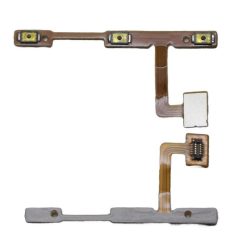
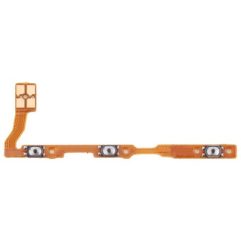
This product can replace your damaged Flex button. This button leaf is compatible with your phone. Vivo Y11 Power Key Flex Cable.
- It is made from good material. Very good quality. Works 100% properly.
- You can replace your old worn out flex cable with this one, it’s perfect for this
- Designed for your Vivo Y11, this product will fit your handset perfectly.
- Before shipping the product to you, we check that it is absolutely correct. Only then do we shipping the product.
- This product is non-returnable. Please confirm your phone model before ordering.
- Product photos are for representation only. Product images may vary slightly.
For the original Vivo Y11 (2019 / Model V1906), the power key is a straightforward mechanical component. Unlike the modern “s” or “A” variants, this model features a rear-mounted fingerprint sensor, meaning the power button itself does not contain any biometric hardware.
⚙️ Component Functions & Details
The replacement part for the Vivo Y11 is a 2-in-1 flexible printed circuit (FPC) assembly that handles the following:
Power On/Off Control: Provides the internal mechanical contacts for the side power button to wake the device, lock the screen, or perform hard resets.
Volume Adjustments: Includes the integrated switches for both the Volume Up and Volume Down buttons.
Mechanical Nature: This cable is purely for physical button signals. It does not contain any biometric sensors, which makes it a simpler and more affordable repair compared to later models with integrated side-scanners.
Product Specifications
| Feature | Detail |
| Component Type | Power & Volume Button Flex Cable Ribbon |
| Compatible Model | Vivo Y11 (2019) / Model V1906 |
| Interchangeability | Widely shared with the Vivo Y12, Y15, and Y17. |
| Common Fix For | Buttons that are stuck, have lost their “click” feel, or are completely unresponsive. |
| Installation | Requires opening the back panel and disconnecting the flex from the motherboard. |
Important Maintenance Notes
Fingerprint Sensor is Separate: If you are having trouble with fingerprint recognition, you need to replace the Rear Fingerprint Sensor Flex, as it is a completely independent part from the power and volume buttons.
Identify Your Model: You can confirm you have this version if your fingerprint scanner is a circular/oval pad located on the back cover of the phone rather than the side.
Flex Fragility: The ribbon cable is extremely thin and fragile. When installing, ensure there are no sharp kinks or tears, as even a hairline crack will cause the buttons to fail.

rishibabu58800 –
nice product