

Description
Product Details :-
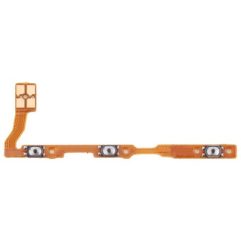
This product can replace your damaged Flex button. This button leaf is compatible with your phone. Vivo Y76 5G Power Key Flex Cable.
- It is made from good material. Very good quality. Works 100% properly.
- You can replace your old worn out flex cable with this one, it’s perfect for this
- Designed for your Vivo Y76 5G , this product will fit your handset perfectly.
- Before shipping the product to you, we check that it is absolutely correct. Only then do we shipping the product.
- This product is non-returnable. Please confirm your phone model before ordering.
- Product photos are for representation only. Product images may vary slightly.
The Vivo Y76 5G Power Key is a crucial internal spare part, typically sold as a Power Button Flex Cable.1 Due to the phone’s design, this single component is responsible for several essential functions.
Here are the key details of the Vivo Y76 5G Power Key Flex Cable:
⚙️ Component Functions
The replacement flex cable is an integrated unit that handles all the functions of the side keys:
Power On/Off Control: It carries the circuit necessary to register presses of the power button for turning the device on/off and locking/unlocking the screen.
Volume Control: It includes the contacts for the Volume Up and Volume Down buttons, allowing audio level adjustment.
Fingerprint Sensor Integration: The Vivo Y76 5G features a side-mounted fingerprint scanner that is physically part of the power button. The flex cable must include the circuitry and connector for this biometric sensor to function correctly. A faulty power key flex cable can often lead to the fingerprint sensor failing.
Product Specifications and Quality
| Feature | Detail |
| Component Type | Power Button Flex Cable (On/Off Flex / PCB) |
| Compatible Model | Vivo Y76 5G (Model V2124) |
| Quality | Typically sold as A+ Quality, Original, or High-Quality Compatible. |
| Fitment | Precision-machined to be a 100% perfect fit for the device. |
Repair and Installation Advice
Testing is Essential: Always test the new flex cable by connecting it to the motherboard before completing the full installation (i.e., before removing protective films or using adhesives).
Professional Installation: Replacement requires opening the phone and handling delicate internal connectors. Professional technical expertise is highly recommended, as improper installation can cause damage to the phone or the new part.
Handle with Care: Flex cables are thin and fragile. Avoid bending, twisting, or pulling them excessively.



Reviews
There are no reviews yet.