

Description
Product Details :-
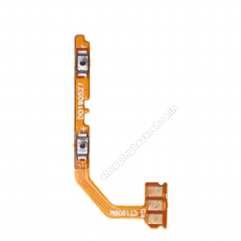
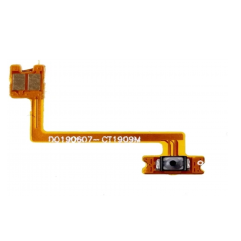
This product can replace your damaged Flex button. This button leaf is compatible with your phone. Realme C2 Power Key Flex Cable.
- It is made from good material. Very good quality. Works 100% properly.
- You can replace your old worn out flex cable with this one, it’s perfect for this.
- Designed for your Realme C2 , this product will fit your handset perfectly.
- Before shipping the product to you, we check that it is absolutely correct. Only then do we shipping the product.
- This product is non-returnable. Please confirm your phone model before ordering.
- Product photos are for representation only. Product images may vary slightly.
Realme C2 On/Off Power Switch Key Flex Cable
Restore the responsiveness of your Realme C2 with this high-quality replacement Power Button Flex Cable.
If your phone’s power button feels stiff, requires hard pressing to work, or has stopped responding entirely, the issue is likely not the plastic button itself, but the internal flex cable mechanism. This precise replacement part connects the physical button on the side of your device to the motherboard, restoring the original “click” and functionality.
🚀 Key Features
- Precision Fit: Engineered specifically for the Realme C2, ensuring perfect alignment with the motherboard connector and chassis.
- Restore Functionality: Fixes issues such as unresponsive power buttons, buttons that require excessive force, or “ghost” pressing (random restarts).
- High-Quality Conductors: Manufactured with durable FPC (Flexible Printed Circuit) materials to withstand daily wear and tear.
- Plug-and-Play: Features a snap-on connector that attaches directly to the motherboard—no soldering required.
- Tactile Feedback: Restores the satisfying “click” feel when pressing the power button.
📋 Technical Specifications
| Feature | Detail |
|---|---|
| Product Type | Power Button On/Off Switch Flex Cable |
| Compatible Brand | Realme (and select Oppo models) |
| Compatible Model | Realme C2 (RMX1941, RMX1945, RMX1943) |
| Connection Type | 12-Pin Motherboard Connector (Snap-on) |
| Bend Angle | ~45-degree angle (Device specific layout) |
| Material | Flex Ribbon / PCB |
| Part Condition | New / OEM Replacement Grade |
📱 Compatibility Check
⚠️ Important: Please verify your phone model number before purchasing. This cable is NOT compatible with Realme C1, C3, or C11, as the internal layouts differ.
Compatible Models:
- Realme C2
- Model: RMX1941
- Model: RMX1945
- Model: RMX1943
- Oppo A1k (CPH1923) [Note: Often shares the same part, but verify visual layout]
🛠️ When Do You Need This Part?
You should consider replacing this part if your device exhibits the following symptoms:
- Unresponsive Button: Pressing the power button does nothing, even though the battery is charged.
- Hard Press Required: You have to press the button very hard or at a specific angle to get a response.
- No “Click” Sound: The button feels “mushy” or stuck inside the frame.
- Boot Loops: The phone restarts constantly on its own (caused by the internal switch being stuck in the “pressed” position).
- Intermittent Function: The button works sometimes but fails at other times.
⚠️ Installation & Safety Guide
Disclaimer: This is a delicate internal component. Professional installation is highly recommended to avoid damaging the motherboard or battery.
General Installation Overview:
- Power Down: Ensure the device is turned off.
- Remove Tray: Eject the SIM card tray.
- Open Back Cover: Carefully pry open the back panel using a plastic opening tool. Be gentle near the fingerprint sensor (if applicable, though C2 typically lacks a rear sensor).
- Unscrew Shield: Remove the screws securing the motherboard cover/shield.
- Disconnect Battery: ALWAYS disconnect the battery connector first to prevent short circuits.
- Replace Flex:
- Locate the power button flex on the side of the frame.
- Gently peel off the old flex cable (it is held by mild adhesive).
- Disconnect the connector from the motherboard.
- Place the new flex cable in the exact same position and press the connector firmly onto the socket.


Reviews
There are no reviews yet.